



Crafting effective URL slugs is a critical yet often overlooked aspect of search engine optimization. A well-optimized slug not only enhances your website’s visibility but also improves user experience by creating clear, memorable links. In the digital landscape of 2024, where AI-driven search tools are becoming more prevalent, understanding how to craft and optimize slugs can give your site a significant advantage. This guide explores what slugs are, why they matter, and how to optimize them for maximum impact.
When discussing SEO, especially within WordPress or other content management systems, the term “slug” frequently comes up. But what exactly is a slug? And how can you leverage it to boost your site’s performance? From technical definitions to practical editing tips, this article provides a comprehensive overview. Additionally, you’ll learn how tools like Yoast SEO help automate and refine the process, ensuring your URLs are both user-friendly and aligned with your SEO strategy.
Throughout this guide, you’ll find actionable best practices, common pitfalls to avoid, and insights into how optimized slugs influence your rankings—especially in the era of AI-powered search algorithms. Whether you’re a beginner or looking to fine-tune your existing URL strategy, mastering slug optimization is essential for achieving higher visibility and stronger engagement.
What is a slug?
A slug is the specific part of a URL that uniquely identifies a particular page on your website in an easy-to-read format. It appears after your domain name and provides descriptive information about the content of the page. Think of it as a digital label that helps both visitors and search engines understand what the page is about at a glance.
For example, in the URL https://yoast.com/slug, the segment slug is the page’s slug. It’s a simplified, human-readable string that replaces complex parameters or IDs, making URLs more intuitive and easier to remember. Clear, descriptive slugs serve as a vital component of your overall SEO approach, helping search engines associate keywords with your content.
What is a slug URL?
When people ask about a “slug URL,” they are referring to the entire web address that includes the slug component. The slug URL is the complete path that directs users and search engines to your specific content. It combines your domain name with the slug to form a coherent address.
For example, a full slug URL might be https://example.com/seo-tips-for-2024, where /seo-tips-for-2024 is the slug. This combination helps clarify the page’s topic, making it more attractive to both users and search engines. Properly structuring your slug URL enhances your site’s clarity and indexing efficiency.
How to edit a URL slug
In WordPress, editing the slug is straightforward and can be done directly within the post or page editor. When creating or editing content, the permalink section allows you to customize the URL segment that appears after your domain. Here’s how:
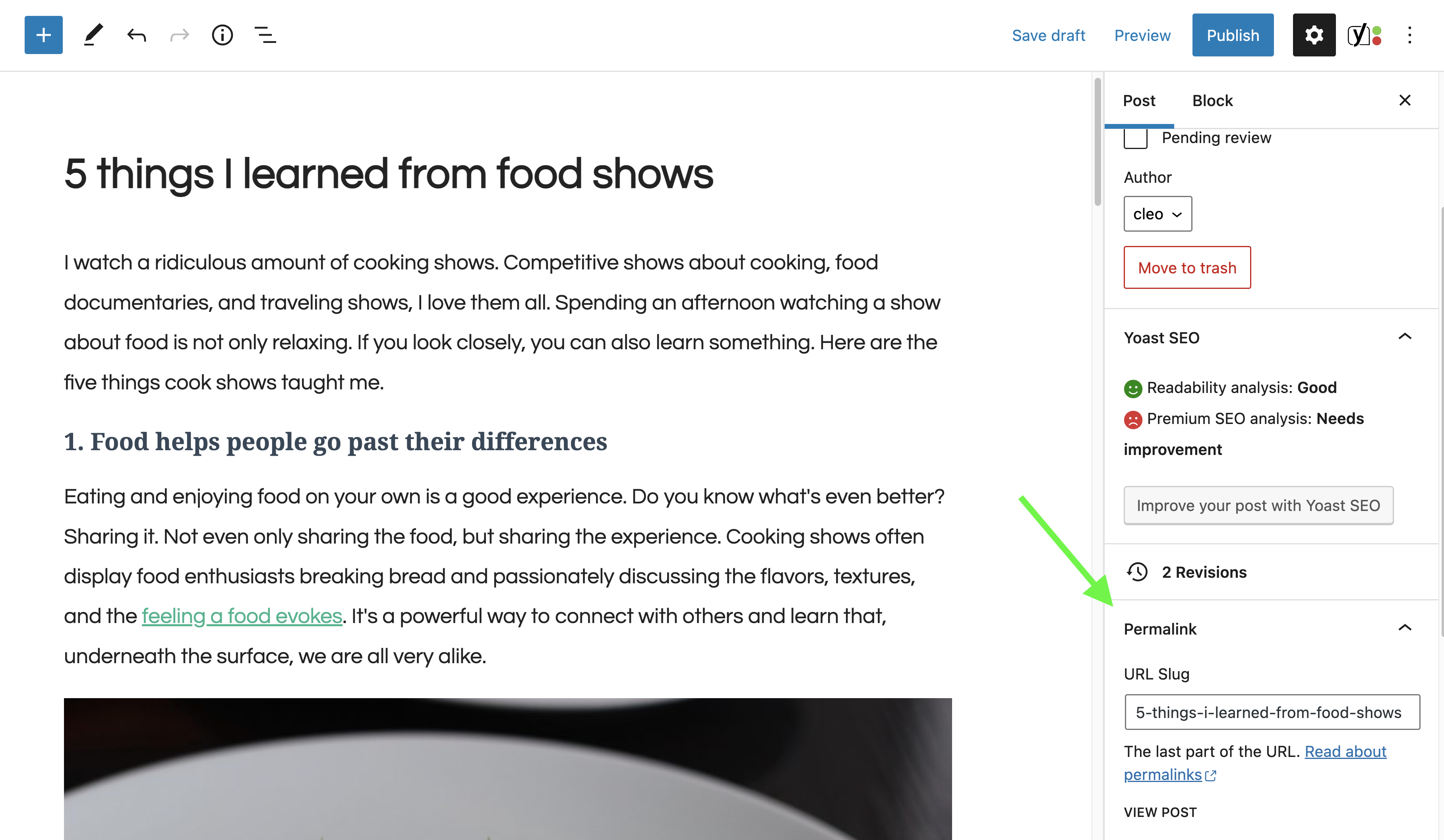

Ensure your permalink settings are configured correctly by navigating to Settings > Permalinks in your dashboard. It’s recommended to select a structure that includes relevant keywords, as this provides both humans and search engines with more meaningful information about your page—beyond generic IDs or parameters.
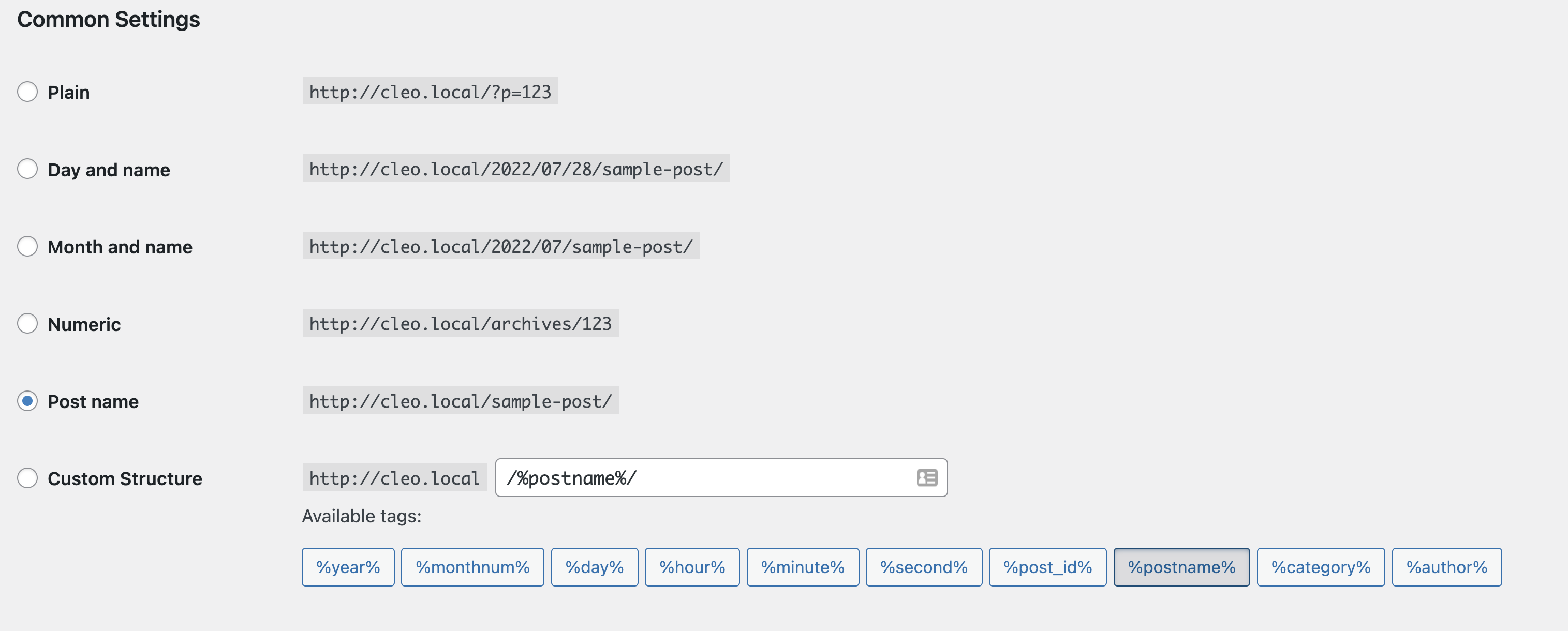

Be cautious when changing permalinks on a live site; frequent modifications can cause broken links and SEO issues. If you need to update a slug, always set up proper redirects to preserve your search rankings and avoid 404 errors.
For Shopify users, editing a slug involves using the ‘Search engine listing preview’ feature, accessible through the page settings or Yoast SEO’s Shopify integration. Shopify refers to the slug as the ‘handle,’ but it functions identically.
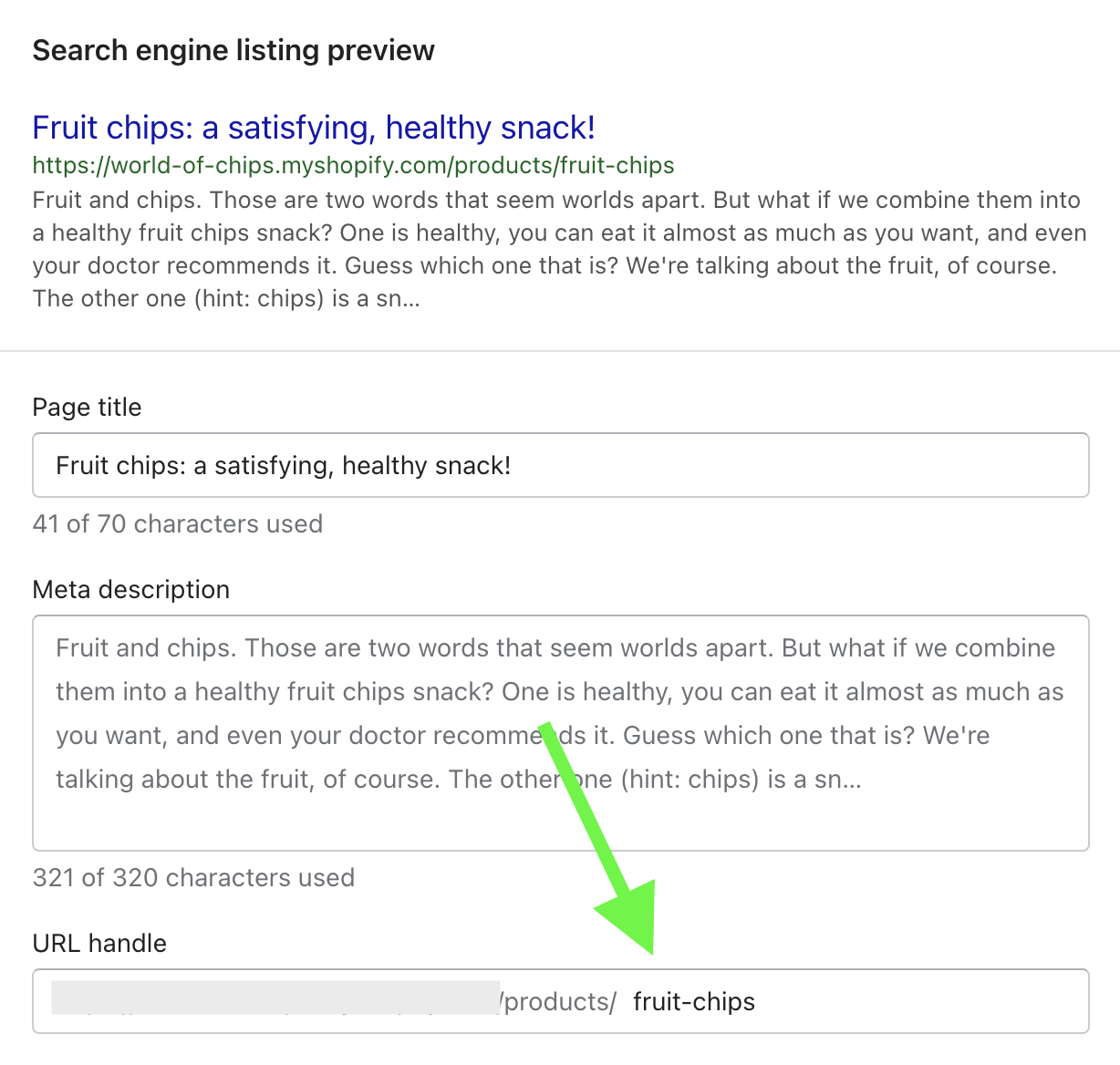

Alternatively, in the Yoast SEO interface for Shopify, you can quickly enter a new slug in the dedicated field, ensuring your URLs stay optimized.
What is a slug on a website?
A website slug acts as a unique identifier for each individual page or post. It functions as the digital address that guides browsers and search engines directly to your content. Every page must have a distinct slug to prevent confusion and to facilitate proper indexing by search engines.
For instance, a recipe blog might feature slugs like:
-
/chocolate-chip-cookies -
/homemade-pizza-dough -
/best-pasta-carbonara
These descriptive slugs immediately inform visitors about what they’ll find, enhancing both navigation and SEO.
What is a WordPress slug?
A WordPress slug operates exactly the same way as a general URL slug but benefits from WordPress’s built-in features that simplify its creation and editing. When you publish a new post or page, WordPress automatically generates a slug based on your title. However, default slugs often need refinement to optimize for search engines and readability.
You can manually edit these slugs in the post editor or via the permalink settings to better target keywords and improve user experience.
What is an SEO slug?
An SEO-optimized slug is a URL segment tailored to enhance search engine rankings while remaining accessible and straightforward for users. Unlike generic or auto-generated slugs, SEO slugs strategically include relevant keywords, are concise, and accurately reflect the page content.
Examples of SEO-friendly slugs:
-
/best-wordpress-seo-plugins -
/ultimate-guide-to-website-design -
/top-10-tips-for-2024
In contrast, less optimized slugs might look like /post-12345 or /article?id=678. Well-crafted SEO slugs help search engines understand your content’s focus and improve your chances of ranking higher for target keywords.
How WordPress and Yoast SEO help with slugs
WordPress’s automatic slug creation provides a good starting point, but combining it with Yoast SEO enhances your ability to craft effective URLs. Yoast SEO analyzes your slugs in real time, checking for focus keyphrase inclusion, length, and uniqueness.
WordPress’s default slug generation creates slugs from titles, like “10 Best WordPress Plugins for 2025,” resulting in /10-best-wordpress-plugins-for-2025. However, Yoast SEO offers recommendations to refine these slugs further, making them more aligned with your SEO goals.
Yoast SEO’s slug optimization features include:
-
Analyzing if your focus keyphrase appears in the slug
-
Providing suggestions to shorten or enhance the slug
-
Preventing duplicate slugs across your site
With the AI+ features, Yoast further streamlines slug and title optimization by offering AI-generated suggestions, ensuring your URLs support your overall content strategy. This is especially useful when managing large sites or eCommerce catalogs, where manual optimization can be tedious.
Why are URL slugs important for SEO?
Creating effective slugs significantly influences your search engine rankings and user engagement. Here’s why:
1. Incorporating your target keywords
Search engines use slugs as a key indicator of your content’s relevance. Including your focus keywords helps signal to Google and other search engines what the page is about, increasing the likelihood of ranking higher for those terms. For example, a URL like /wordpress-seo-tips is more effective than /post-123.
In the context of AI search platforms like ChatGPT, descriptive URLs help AI understand and categorize your content, boosting your visibility in AI-driven answers. Moreover, a well-optimized slug can improve your click-through rate (CTR) by giving users confidence that your content matches their query.
2. Creating user-friendly URLs
Readable, descriptive slugs improve the overall user experience. When browsing search results, users are more likely to click on URLs that clearly indicate the content’s value. For example, a URL like yoast.com/wordpress-seo is more trustworthy than yoast.com/?p=607.
Benefits of user-friendly slugs include:
-
Increased CTR
-
Enhanced trustworthiness
-
Easier sharing on social media
-
Better memorability for repeat visitors
3. Supporting mobile-first indexing and Core Web Vitals
Google prioritizes mobile content in its ranking algorithms. Short, simple slugs are easier to read and faster to load on mobile devices, improving overall user experience. Clean URLs also contribute positively to Core Web Vitals, a set of metrics Google uses to evaluate site performance.
By keeping your slugs brief, relevant, and free of unnecessary words, you reduce friction for users and search engines alike, helping your site perform better in search rankings.
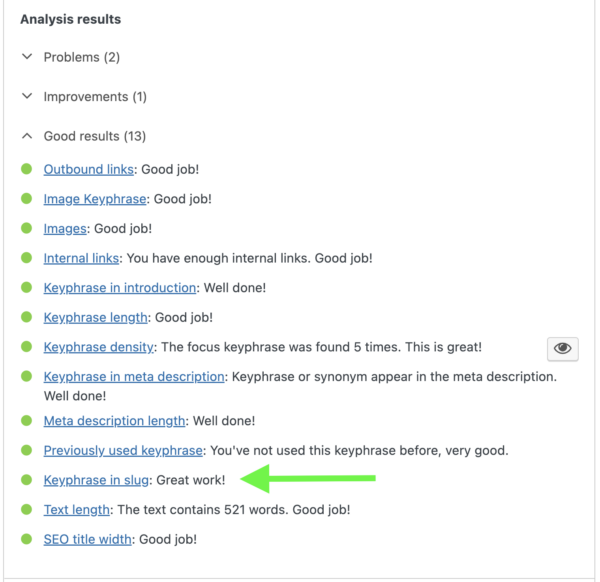
What does the keyphrase in slug assessment in Yoast SEO do?
The Yoast SEO plugin evaluates whether your focus keyphrase appears in the URL slug. This check is crucial because including your target keywords in the slug enhances relevance signals for search engines. When the focus keyphrase is missing, the plugin displays an orange or red indicator with feedback indicating the slug needs improvement.
To fix this, simply edit your slug to naturally incorporate your focus keyphrase. Yoast then re-analyzes and provides a green light once your URL aligns with SEO best practices. This process helps ensure both search engines and users quickly grasp the page’s main topic, boosting your chances of higher rankings.

How to optimize your slug in WordPress for SEO
Creating an SEO-friendly slug involves thoughtful steps. Follow these six essential practices:
1. Include your focus keyphrase
Always embed your primary keyword in the slug. For example, if your focus is “WordPress SEO tips,” a suitable slug would be /wordpress-seo-tips. Yoast will alert you if the keyphrase is missing, helping you optimize further.
2. Minimize function words
Default slugs often contain words like “a,” “the,” “and,” which may be unnecessary. Removing these words shortens your URL and sharpens its focus without sacrificing clarity.
3. Add relevant words and eliminate unnecessary ones
Aim for a balance between brevity and clarity. For example, a long slug like /what-is-a-slug-and-how-to-optimize-it can be trimmed to /slug-optimization. Short, descriptive slugs are more memorable and effective.
4. Keep slugs concise and descriptive
Limit your slugs to about 3-5 words or 30-50 characters. This ensures they’re easy to read, display fully in search results, and are mobile-friendly.
5. Use lowercase letters and hyphens
Always use lowercase to avoid confusion and hyphens to separate words. For example, /seo-tips-for-2024 is ideal. Avoid underscores or spaces, which are less readable.
6. Make slugs permanent and avoid keyword stuffing
Once published, avoid changing slugs unless necessary. If you do, set up 301 redirects to prevent SEO losses. Focus on one primary keyword per slug to maintain clarity and avoid spammy URLs.
By implementing these best practices, your URLs will become powerful tools that support your overall SEO efforts. For more strategies, explore how to create SEO-friendly URLs.
Conclusion
Understanding the importance of slugs and how to optimize them significantly enhances your website’s SEO and user engagement. Well-crafted, keyword-rich slugs are easier for search engines to interpret, improve your click-through rates, and provide a better experience for visitors—especially on mobile devices. With tools like Yoast SEO and a clear strategy, you can turn simple URL segments into powerful assets that drive traffic and boost your rankings in the competitive digital landscape of today and tomorrow.