


Creating a professional website has become more accessible than ever, thanks to the proliferation of website builders. Whether you’re a small business owner, freelancer, or hobbyist, these platforms allow you to design, customize, and launch a website without needing coding skills. However, with so many options available, selecting the right builder can be daunting. This guide offers an in-depth review of the top providers for 2025, helping you find the perfect match for your needs.
Website builders simplify the web development process by presenting complex coding and design tasks through user-friendly interfaces. They typically include a selection of templates, drag-and-drop editors, and integrated features, enabling anyone to craft a visually appealing online presence. Although all builders operate on these principles, their capabilities and target audiences vary significantly, making it essential to understand their differences.
In this comprehensive review, we evaluate 14 leading website builders based on ease of use, design flexibility, features, support, and pricing. Our goal is to help you make an informed decision and avoid common pitfalls like limited customization options or hidden costs. Whether you’re aiming for a simple landing page or a sophisticated online store, our rankings highlight the strengths and weaknesses of each platform.
Throughout the article, you’ll find links to authoritative resources and tools that can enhance your website development process. For instance, exploring how to create scalable and secure web applications involves understanding concepts such as deploying a robust serverless backend, which you can learn more about at building a robust serverless web application from scratch. Additionally, leveraging the benefits of serverless architecture can significantly improve your website’s performance and scalability, as discussed in unlocking the power of serverless architecture for modern web development.
Now, let’s dive into the specifics of each platform, starting with the all-around champion for 2025.
The Top Website Builders of 2025
Wix: The Versatile Leader and Overall Winner


Wix has pioneered the “No Code” movement, allowing users to create highly customized websites since 2006. Its long-standing presence on the market translates into an extensive feature set, making it a top choice for beginners and experienced designers alike.
What We Appreciate About Wix
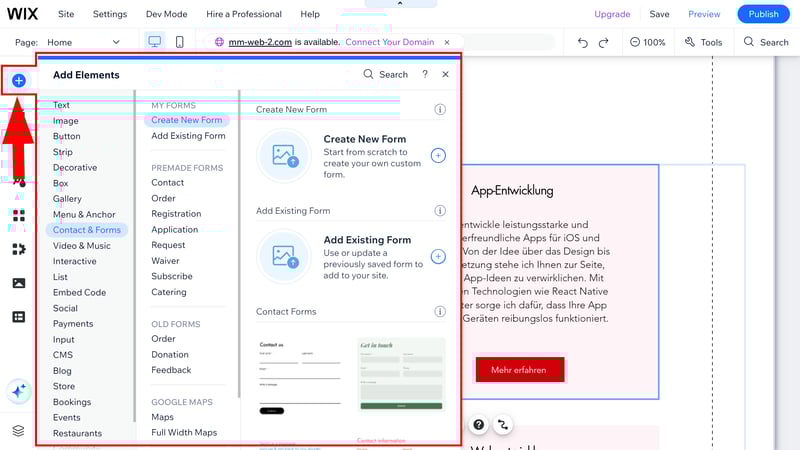
Wix stands out for its remarkable flexibility: it offers an enormous variety of templates, elements, and features that can be combined to craft unique websites. Its drag-and-drop editor provides full control over element placement, enabling users to design layouts that truly reflect their brand or personal style.
The platform’s extensive app market extends functionality with free and paid extensions, covering everything from booking systems to advanced marketing tools. For businesses aiming to reach international audiences, Wix supports multilingual sites without hassle.

Advantages and Drawbacks
Pros
- Over 800 professionally designed templates across diverse categories.
- Highly customizable, with global and element-specific design controls.
- Rich feature ecosystem, including SEO tools, e-commerce options, and marketing integrations.
- Intuitive interface suitable for both novices and advanced users.
- Multilingual website support.
Cons
- The editor can be complex for absolute beginners due to its extensive options.
- Slightly slower performance compared to simpler builders.
- Still operates as a closed system, limiting backend control compared to open-source solutions like WordPress.
Overall, Wix is ideal for small businesses, freelancers, and individuals who desire creative freedom without technical hurdles. Its versatility makes it suitable for nearly any project, from simple portfolios to complex e-commerce stores.
Squarespace: Elegant Designs and Powerful Features


Squarespace has established itself as a premium platform with its modern, stylish templates. Originating from New York, it appeals to creatives and professionals who prioritize aesthetics alongside functionality.
What Makes Squarespace Special
With a focus on high-quality visual presentation, Squarespace’s templates are among the most attractive on the market. The editor’s customization options are robust, allowing users to create dynamic, engaging websites that stand out.
Its e-commerce capabilities are particularly strong, supporting digital and physical products, memberships, and event ticketing. The platform also offers solid SEO tools and marketing features, making it a comprehensive solution for small to medium-sized online stores.
Strengths and Weaknesses
Advantages
- Over 150 sleek, modern templates designed for various industries.
- User-friendly editing interface with extensive customization options.
- Advanced e-commerce features suitable for small and medium enterprises.
- Built-in SEO and marketing tools.
Limitations
- No free plan; a paid subscription is required for all features.
- Support can be inconsistent, with some users reporting slow responses.
- Slightly limited design flexibility compared to open-source platforms like Webflow.
- Multilingual website creation involves extra steps or paid add-ons.
Squarespace is especially recommended for creatives, artists, and businesses that rely heavily on visual content. Its polished templates and powerful e-commerce tools make it an excellent choice for portfolios, boutiques, and service providers.
Webflow: The Designer’s Dream with Code-Like Flexibility


Webflow blurs the line between traditional website builders and professional-grade CMS platforms. Geared toward designers, developers, and agencies, it offers a visual interface that mimics tools like Figma, with the ability to craft highly customized websites.
What We Like About Webflow
Webflow’s unique approach allows users to arrange content containers visually, using an advanced box model similar to CSS. It provides comprehensive control over styling, animations, and interactions, making it ideal for bespoke, interactive websites.
Its integrated CMS facilitates dynamic content management across multiple pages, streamlining updates for blogs, portfolios, or catalogs. The platform’s learning resources, such as Webflow University, help users develop their skills gradually.
Pros and Cons
Pros
- Complete creative freedom with a visual design environment comparable to professional tools.
- Built-in CMS for managing complex, dynamic content.
- Excellent collaboration features for teams.
- Advanced animations and responsive design controls.
Cons
- Steep learning curve; not suitable for beginners.
- Higher costs, especially when utilizing CMS or e-commerce features.
- Limited native e-commerce; external integrations needed for online selling.
- Support primarily community-based, with limited direct assistance.
Webflow is best suited for experienced designers and developers aiming for pixel-perfect websites with advanced interactivity. Its flexibility exceeds standard builders but requires a dedicated learning effort.
Duda: The Developer-Friendly Platform for Agencies


Duda has built a reputation for serving agencies and teams that need to create multiple, client-specific websites efficiently. Its intuitive editor combined with developer tools makes it a versatile choice for professional web design.
Highlights of Duda
Duda’s container-based structure simplifies complex layouts, and its Advanced Grid feature allows overlapping elements for sophisticated designs. The platform also offers white-label options, client management tools, and the ability to edit HTML and CSS directly for advanced customization.
Advantages and Disadvantages
Pros
- Extensive design options with high flexibility.
- No-code editor with drag-and-drop functionality.
- Built-in client management and white-label solutions.
- Good support for multilingual websites.
Cons
- Higher pricing tiers for advanced features.
- Slightly steeper learning curve for beginners.
- Limited blogging capabilities compared to dedicated platforms.
- Some features, like e-commerce, require additional investment.
Duda is ideal for agencies, digital teams, and freelancers managing multiple client projects. Its combination of ease of use and developer access supports scalable web development.
Strikingly: Simplicity for One-Page Websites


Designed for beginners, Strikingly enables quick creation of clean, simple websites, especially single-page sites. Its minimalist approach minimizes design complexity, making it suitable for startups, portfolios, and landing pages.
What We Like
Strikingly’s templates are affordable and straightforward. The builder uses section-based templates that limit customization but ensure a cohesive look. Its interface is intuitive, ideal for users seeking a fast setup without extensive design efforts.
Strengths and Weaknesses
Advantages
- Over 180 templates catering to various styles.
- Very easy to learn and use.
- Reliable live chat support.
- Affordable pricing plans.
Limitations
- Limited design freedom; customization options are basic.
- Fewer templates and elements for complex features.
- Not suitable for multi-page websites or advanced functions.
- Slightly outdated editor interface.
Strikingly is best for users needing a quick, professional-looking site with minimal fuss. It’s perfect for landing pages or simple portfolios but not for more demanding websites.
Distribution of Key Features and Final Rankings
The platforms reviewed vary widely in features such as template variety, design flexibility, e-commerce capabilities, multilingual support, and support channels. Our evaluation considers all these aspects equally, assigning scores that culminate in an overall ranking.
| Platform | Overall Score | Strengths | Weaknesses |
| — | — | — | — |
| Wix | 92/100 | Extensive features, high customization, multilingual support | Slight complexity, performance lag |
| Squarespace | 85/100 | Elegant templates, strong e-commerce | No free plan, support issues |
| Webflow | 88/100 | Professional design, flexible CMS | Steep learning curve, higher cost |
| Duda | 86/100 | Agency-friendly, developer tools | Pricey, limited blogging |
| Strikingly | 75/100 | User-friendly, quick setup | Limited customization, basic features |
How We Evaluated
Our review process assesses five core categories:
- Ease of use (25%)
- Templates & Design (30%)
- Advanced features (25%)
- Support (10%)
- Pricing (10%)
Each category is scored objectively based on the platform’s offerings and user experience, then combined to produce the final ranking.
For deeper insights into creating websites optimized for modern needs, consider exploring building a scalable, serverless web app or harnessing serverless architectures for efficiency. These concepts can enhance your website’s performance and scalability.
Final Thoughts
Choosing the right website builder depends on your specific project requirements, budget, and technical comfort level. Providers like Wix offer a balanced mix of simplicity and versatility, making them suitable for most users. For those prioritizing stunning visuals and e-commerce, Squarespace is an excellent choice. Webflow appeals to advanced users seeking full creative control, while Duda caters to agencies managing multiple sites.
Remember, even the most user-friendly platforms have a learning curve. Investing time in understanding your chosen tool will result in a more professional and effective website.
Explore our full comparison to discover more about each platform’s strengths and limitations, and find the perfect website builder for your 2025 projects.