


Building a website is a strategic investment that can significantly enhance brand visibility, facilitate transactions, and foster customer engagement. As the digital face of your business, a well-crafted website reflects your brand’s identity and operational needs. Whether you’re a company seeking a new website or an agency aiming to attract clients, establishing clear communication channels is essential. One effective method for connecting with the right web development partners is through a website Request for Proposal (RFP).
In this guide, you’ll learn everything about issuing and responding to website RFPs—covering their purpose, benefits, and best practices. We’ll walk through each phase with practical steps and provide sample templates to streamline your process. From understanding the basics to evaluating proposals, this resource equips you with the tools to make informed decisions or craft compelling responses.
Understanding Website RFPs
What is a Website RFP?
A website Request for Proposal (RFP) is a comprehensive document that helps organizations compare and select web service providers. It outlines project requirements, background information, technical needs, and scope, enabling vendors to submit tailored proposals. The RFP process facilitates informed decision-making by providing a structured comparison framework, ensuring transparency and fairness.
Why Use an RFP?
Implementing a website involves numerous considerations—from design and technical features to integration and security. An RFP consolidates these requirements, bringing clarity amidst complexity. It benefits both buyers and vendors:
- Encourages competitive pricing by inviting multiple proposals.
- Highlights vendor experience and expertise, aiding in selecting the best fit.
- Ensures objectivity through a standardized evaluation process, which can be crucial for regulatory compliance.
For an in-depth understanding of the RFP process, consider exploring this comprehensive guide on the RFP process.
Types of Website RFPs
Different projects require tailored RFPs. Common types include:
- Web development RFP
- Web design RFP
- Website redesign RFP
- Web portal development RFP
- Custom web application RFP
- Maintenance and support RFP
Choosing the right type depends on your objectives, whether building anew, redesigning, or maintaining an existing platform.
Issuing and Managing a Website RFP
The RFP process can be simplified into three key phases: Creation, Administration, and Evaluation.
1. Creating Your RFP
Define Your Needs and Draft the RFP
Start with input from cross-functional stakeholders—marketing, sales, IT, and operations. Key questions to clarify include:
- How does your current website serve your business?
- What improvements are needed?
- What features and functionalities are priorities?
- What is your budget and timeline?
These questions help frame your project scope and establish evaluation criteria.
Conduct Research and Gather Inspiration
Identify desired functionalities and design features. Review competitors’ websites for insights, noting any integrations, security measures, and accessibility standards. This research helps craft a detailed and targeted RFP.
Develop a Clear Timeline
Set milestone deadlines, including:
- RFP issuance date
- Q&A submission window
- Proposal submission deadline
- Evaluation period
- Shortlisting and presentation stages (if applicable)
- Final vendor selection
A well-defined timeline keeps the process on track.
Draft Your RFP Document
Organize your RFP with sections such as:
- Company & project background
- Goals and objectives
- Scope and features
- Budget and timeline
- Submission guidelines
- Evaluation criteria
- Specific questions for vendors
Include targeted questions covering management approach, technical expertise, security, and support. For example:
- What is your project management methodology?
- How do you handle testing and quality assurance?
- Can you provide references from similar projects?
2. Managing the RFP
Narrow Down Your Vendor List
Limit your candidate pool to around six agencies to streamline the process. Use RFP software or email invitations for distribution.
Handle Follow-Ups and Clarifications
Vendors may have questions during the Q&A phase. Respond consistently and transparently to all bidders, ensuring fairness. Keep all communication centralized, either through RFP management platforms or via email.
Reminders and Deadlines
If responses are delayed, send polite reminders to ensure timely submissions. Tracking responses helps in maintaining transparency and fairness.
3. Evaluating Proposals
Review and Score Submissions
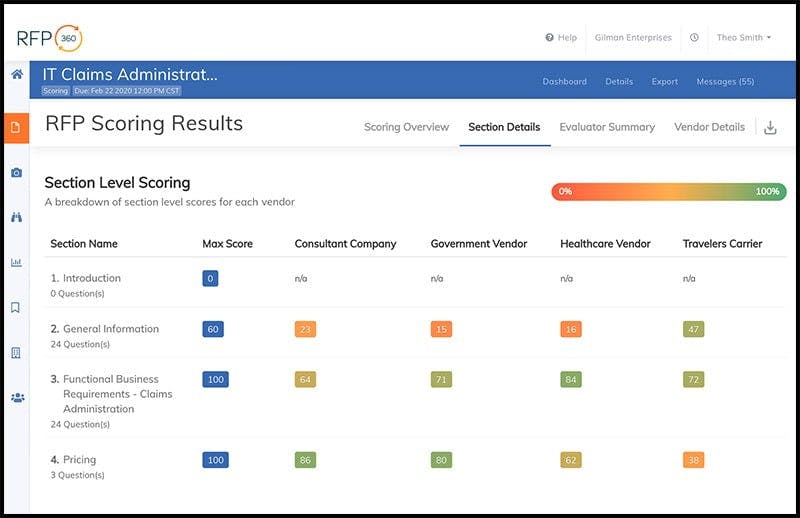
Check for completeness and compliance. Use scoring frameworks—preferably with weighted criteria—to objectively compare proposals. Engage relevant stakeholders, such as IT, marketing, and project managers, for specialized review.

Select and Negotiate
Identify the highest-scoring proposal, then initiate negotiations. Finalize contracts before publicly announcing the winner to ensure clarity and legal protection.
Responding Effectively to a Website RFP
For agencies, crafting compelling responses is key to winning projects. Here are best practices:
Be Selective with Opportunities
Don’t bid on every RFP. Focus on opportunities that align with your expertise and strategic goals. Use the initial Q&A phase to better understand client needs and assess fit.
Streamline Your Proposal Process
Establish a standard process—using project management tools or RFP response software—to improve efficiency. This ensures timely, consistent, and high-quality proposals.
Maintain a Content Library
Save past responses, case studies, and templates to accelerate future proposals. This approach prevents redundancy and ensures messaging remains current. Check out this resource on the most effective software for website text and layout.
Review and Refine Your Proposal
Before submission, review for clarity, accuracy, and compliance. Seek feedback from colleagues unfamiliar with the proposal to identify areas for improvement. Use a clear and professional tone, avoiding jargon, to ensure your message resonates.
Crafting a Memorable Proposal
Executive Summary
Your opening sets the tone. Make it compelling by highlighting your unique strengths and how you will help the client achieve their goals. Use formatting to enhance readability and keep it concise—preferably within two pages.
Cover Letter
Follow with a personalized cover letter that shares your enthusiasm and briefly relates a relevant success story. This section should be approachable and tailored to the specific client.
Clear Messaging
Ensure your responses are cohesive and persuasive. Use simple language and focus on how your solutions meet the client’s needs. Demonstrate understanding and confidence.
Templates, Examples, and Resources
Access ready-to-use templates and real-world examples to inspire your website RFPs and proposals:
- RFP Templates:
- Website redesign (e.g., Franklin County, NC)
- Web development (e.g., Rock Hopper County)
- Sample RFPs:
- W3C website redesign project
- Rockefeller Foundation’s discovery and design RFPs
- Proposal Examples:
- City of Asheville website project
- Mandeo Signage web design proposal
- Stanford Law School website overhaul
Investing time in a thorough RFP process enhances your chances of project success, whether you’re issuing one or responding to it.
For further insights, explore these authoritative resources:
- To understand the nuances of web design, check out what does web design entail 18
- To find top software options for website content and layout, visit what is the most effective software for website text and layout