Finding effective ways to improve your website’s content for search engines doesn’t have to drain your budget. Whether you’re new to SEO or looking for straightforward tools to enhance your writing, there are numerous free or low-cost options tailored for beginners. These tools help refine your content, making it more engaging, readable, and optimized to rank higher in search engine results. With a bit of practice, you can significantly boost your website’s visibility without investing in expensive software.
Let’s explore some of the most user-friendly, affordable content optimization tools that can help you improve your web content with minimal hassle and maximum impact.
1. Hemingway Editor: Simplify Your Writing for Better Readability
Hemingway is an intuitive tool designed to enhance the clarity and readability of your content. Search engines favor content that is easy to understand and quick to digest, making Hemingway an essential part of your SEO toolkit. You can work directly within the app by typing your text or by pasting content from Google Docs, Word, or other writing platforms.
Once your text is loaded, Hemingway highlights five key features:
- Red: Sentences that are very difficult to read.
- Yellow: Sentences that are somewhat hard to read.
- Green: Grammar issues that need correction.
- Blue: Weak words or phrases that can be strengthened.
- Purple: Words with simpler alternatives to improve clarity.
As a freelance writer, I rely heavily on Hemingway daily. I mainly focus on reducing red and yellow highlights to ensure my writing is accessible. If the tool finds no issues, it’s a good sign that your content reads smoothly, much like a well-crafted blog post or article.
For instance, I once wrote a college paper titled “Cuba: A Paradisiacal Oubliette,” which is a fancy way of saying “a prison in paradise.” Simplifying such phrases can make your content more engaging and easier to comprehend. The basic features are free, making Hemingway a valuable resource for content creators on a budget.
Hemingway Pricing
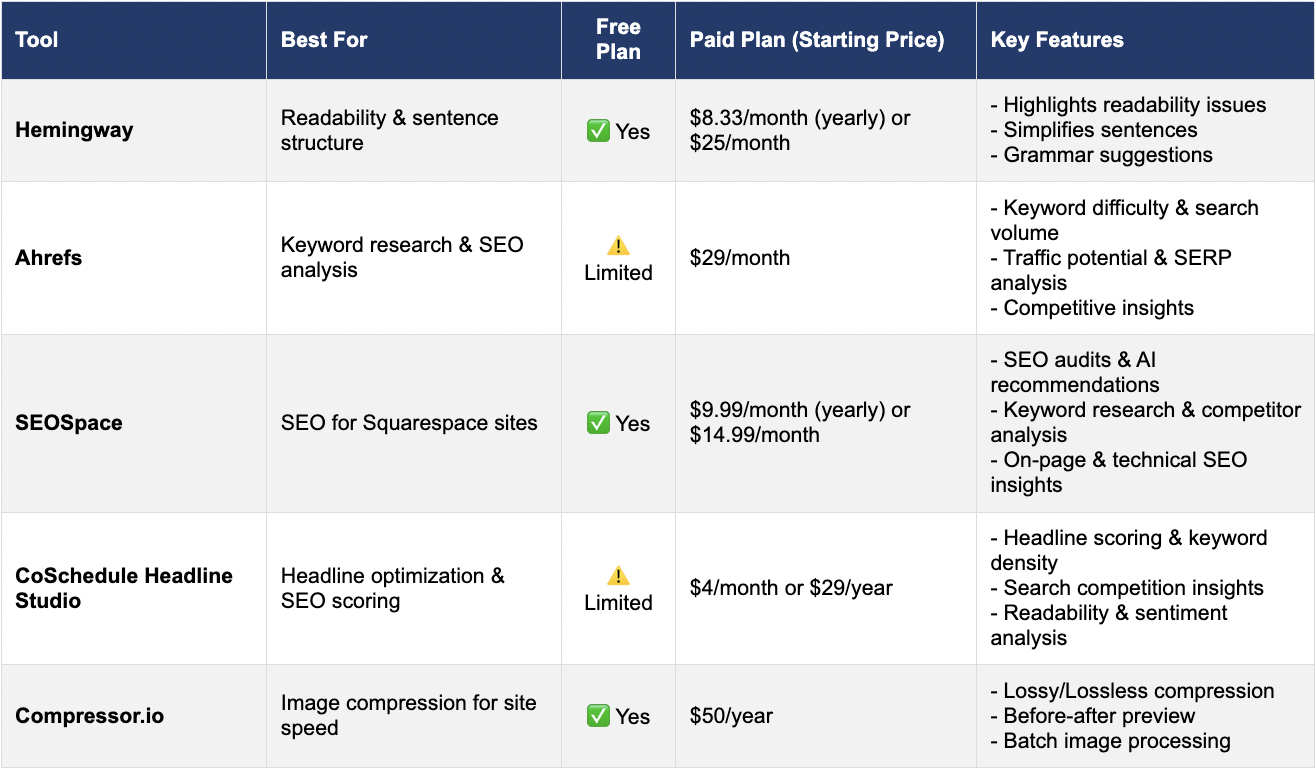
While the web version is free, the desktop app costs $8.33 per month if paid annually, or $25 if billed monthly, offering additional functionalities like editing in offline mode and exporting options.
2. Ahrefs: In-Depth Keyword Research and Competitor Analysis
Ahrefs is a comprehensive SEO platform favored for its powerful keyword research, backlink analysis, and site auditing capabilities. Its user-friendly interface makes it suitable for beginners seeking accurate, up-to-date data to inform their content strategies.
For example, searching for “best dog breeds for kids” provides insights like:
- Keyword Difficulty: 15 (indicating moderate competition)
- Search Volume: 2.2k searches per month
- Traffic Potential: Estimated at 6.6k visitors
- Value: $18 (estimated cost to acquire traffic via paid ads)
- Keyword Intent: Informational, meaning users are seeking advice or knowledge
Such data guides you in creating content tailored to what your audience is actively searching for, increasing the chances of ranking higher. Using these insights, you can craft articles that directly address your target audience’s needs, improving your chances of visibility.
Ahrefs Pricing
A free version provides basic keyword metrics, but for more detailed data, paid plans start at $29 per month for 100 credits, which cover core tools like Keyword Explorer and Site Audit. A more extensive plan with 500 credits begins at $129 per month, but many beginners find the starter plan sufficient for initial projects.
3. SEOSpace: Optimizing Squarespace Websites with Ease
If you use Squarespace for your website, SEOSpace offers a straightforward, user-friendly solution akin to Yoast for WordPress. Although Squarespace allows you to input meta descriptions and titles, it lacks an integrated SEO wizard. SEOSpace fills this gap by providing comprehensive on-page SEO analysis.
After installing the Chrome extension and creating an account, you can run scans on your individual pages. Simply enter your primary keyword, and the tool evaluates your page’s on-page, off-page, and technical SEO factors. It then offers an overall score along with actionable recommendations to improve your content’s ranking potential.
Depending on your subscription plan, SEOSpace can also provide site audits, tutorials, AI-driven suggestions, and competitor analysis, making it a versatile tool for beginners aiming to maximize their SEO efforts.
SEOSpace Pricing
The free tier includes the Chrome plugin and basic tutorials. The DIY plan, costing $14.99/month (with a monthly billing cycle), unlocks features like AI suggestions, site audits, and keyword research. Upgrading to higher plans offers more extensive audits and keyword tools, suitable for growing websites or agencies. All paid plans include a 7-day free trial.
For non-Squarespace users, similar tools exist for platforms like Wix, Shopify, and Webflow, enabling broad SEO optimization regardless of your website platform.
4. CoSchedule Headline Studio: Craft Attention-Grabbing Headlines
Your headlines are the gateway to your content. CoSchedule’s Headline Studio helps you craft compelling, SEO-friendly headlines that attract clicks and improve readability. Just input your proposed headline and click analyze. The tool evaluates your headline based on two scoring systems: the overall Headline Score and the SEO Score.
The Headline Score considers:
- Word balance (common, emotional, power words)
- Headline type (list, how-to, question)
- Readability (reading grade level)
- Sentiment (positive, neutral, or negative)
- Clarity and skimmability
The SEO Score assesses:
- Keyword quality and relevance
- Keyword density
- Search volume and competition
- Keyword trends
- How your headline appears in search results
The interface uses color coding—red, yellow, green—to guide improvements. The goal is to aim for a green overall score, ensuring your headlines are both attractive and optimized for search engines.
CoSchedule Headline Studio Pricing
The free version provides basic headline scoring with limited credits per month. For full SEO scoring and more credits, paid plans start at $4/month, with yearly options available for a better deal. I personally subscribe to the annual plan with 50 credits, which offers ample analysis for multiple headlines.
5. Compressor.io: Optimize Your Images for Faster Loading
Images significantly enhance your web content but can also slow down your site if not optimized properly. Compressor.io is a free tool that helps reduce image file sizes without sacrificing visual quality. It supports formats like JPEG, PNG, GIF, and SVG.
You can upload up to 10 images at a time, each no larger than 10 MB, and choose between lossy or lossless compression:
- Lossy: Significantly reduces file size while maintaining good visual quality.
- Lossless: Slightly reduces size without affecting image quality.
- Custom: Available on paid plans, allowing precise control over compression parameters.
The Before and After comparison feature makes it easy to see the impact of compression. By optimizing images, you improve your site’s loading speed, which is crucial both for user experience and search engine rankings.
Compressor.io Pricing
For more advanced features, the Pro plan costs $50 annually, offering additional customization options and higher limits.
Using these tools effectively can dramatically enhance your website’s SEO performance without requiring a hefty investment. Whether you’re refining your writing, researching keywords, optimizing your site’s structure, or crafting compelling headlines, these resources provide a solid foundation for beginner-friendly content optimization.
If you’re venturing into web design or planning to hire professionals, understanding the basics of SEO tools is essential. For example, when preparing a website proposal, referencing best practices from guides like the guide on issuing and responding to a website RFP can help clarify your needs to developers and agencies. Similarly, knowing how to analyze your content’s position relative to competitors by exploring how above-the-fold content impacts user engagement can lead to more strategic placement of key information.
Start small with free tools, gradually incorporate paid options as your skills grow, and watch your website climb the search rankings with less stress and more confidence.