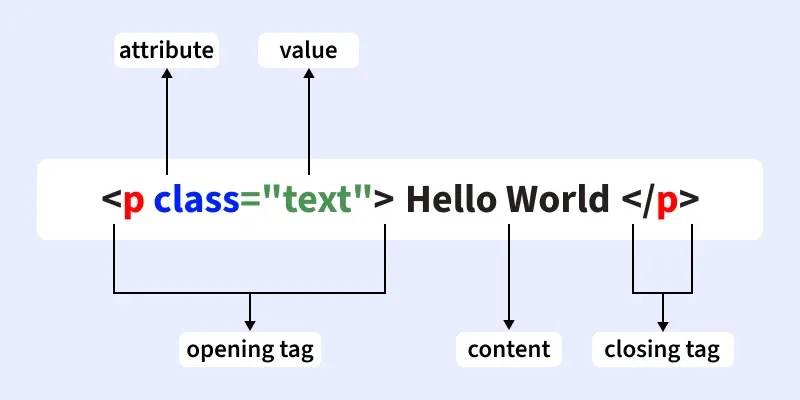
HTML elements form the core building blocks of every webpage, shaping both its structure and content. They define how the text, images, links, and other media are organized and displayed in a browser. Mastery of these elements is essential for creating well-structured, accessible, and visually appealing websites. This guide explores the fundamental concepts, syntax, and types of HTML elements, providing a comprehensive overview for beginners and experienced developers alike.
Introduction to HTML Elements
HTML, or Hypertext Markup Language, is the standard language used to create web pages. Its elements serve as the scaffolding that holds the content together. Each element consists of tags that instruct the browser how to render the content. For example, headings, paragraphs, images, and links are all defined using specific HTML tags. Proper use of these elements ensures that your webpage is both functional and accessible.
Every HTML element begins with an opening tag, contains content or nested elements, and ends with a closing tag. Some elements are self-closing, meaning they do not require a closing counterpart. Browsers interpret these elements to generate the visual layout of a webpage. Ensuring correct nesting and syntax is critical for the page’s validity and performance. For more insights into how web design impacts search engine optimization and page speed, visit this resource.
Basic Syntax of HTML Elements
HTML elements follow a simple syntax pattern:
html

<tagname>Content or nested elements</tagname>
- The
<tagname>is the start tag. - The content can be text, other HTML elements, or attributes.
- The
</tagname>is the end tag, indicating where the element concludes.
Case Sensitivity
While HTML tags are not case-sensitive, it is a best practice to write them in lowercase for consistency and readability. For example, <div> and <DIV> are interpreted the same, but lowercase tags are preferred.
Nested HTML Elements
HTML allows nesting elements within each other, creating a hierarchical structure that organizes content logically and visually. Proper nesting is vital for accessibility and styling. For instance, a <div> can contain multiple <p> tags, images, or lists, forming complex layouts.
“`html
Web Development Insights
Organizing content effectively within web pages is essential for clarity.
“`
In this example, the <html> tag contains <head> and <body>, with further nested elements inside <body>. This hierarchy ensures the browser renders the page correctly.
End Tags and Their Necessity
Most HTML elements require closing tags to define their boundaries explicitly. Omitting end tags can lead to unexpected rendering issues, especially as pages become more complex. Modern browsers often auto-close unclosed tags, but relying on this behavior is discouraged.
For example:
“`html
Welcome to Web Development
Hi, developers!
“`
If the <p> tag is left without a closing </p>, browsers typically insert it automatically, which is visible in developer tools. However, explicitly closing all tags enhances code clarity and prevents potential errors.
Empty HTML Elements
Some HTML elements do not contain content and are called empty or void elements. These include <br>, <hr>, <img>, <input>, and <link>. They do not require end tags and are written as self-closing tags.
“`html
Welcome to GfG
Hello, World!
“`
Using empty elements properly ensures clean and valid HTML code.
Block-Level vs. Inline Elements
HTML elements are categorized based on how they display in the document flow: block-level and inline.
Block-Level Elements
These elements start on a new line and stretch to occupy the full available width. They can contain other block or inline elements. Common examples include:
<div>: A generic container.<p>: Paragraphs.<h1>to<h6>: Headings.<ul>,<ol>: Lists.<table>: Tabular data.<section>,<article>,<nav>,<header>,<footer>: Semantic structural elements.
Block elements structure the page and create visual separation between sections.
Inline Elements
Inline elements do not start on a new line; they flow within block elements and only occupy space as needed. Examples include:
<span>: General inline container.<a>: Hyperlinks.<img>: Images.<strong>,<b>: Bold text.<em>,<i>: Italicized text.<br>: Line break.<input>: Interactive controls.
Understanding the distinction between these two types is crucial for effective layout design.
Practical Applications in Web Development
HTML elements are foundational for structuring and designing websites. Using semantic tags like <section> and <article> improves accessibility and SEO. Proper nesting and syntax ensure the webpage renders correctly across browsers. Additionally, integrating CSS and JavaScript enhances the visual appeal and interactivity of these elements.
For advanced styling and layout techniques, consider exploring CSS frameworks and responsive design principles. To optimize your site further, reviewing how design choices influence speed and search engine rankings is beneficial. You can learn more about these aspects in this detailed guide.
When developing complex websites, choosing the right tools is vital. Modern AI-powered design tools can streamline the process, and discovering the leading solutions can be a game-changer. Insights into top AI design tools are available here. Moreover, selecting a reputable web design agency in Perth can significantly impact your project’s success, as discussed here. If you’re seeking expert coaching in web design business strategies, find out who the leading mentors are here.
Summary
Mastering HTML elements is fundamental for building structured, functional, and accessible websites. From understanding syntax and nesting to distinguishing between block and inline elements, each aspect contributes to creating effective web pages. Properly using empty elements, ensuring correct closing of tags, and organizing content hierarchically are best practices for quality web development. Continual learning about design influences and the latest tools can elevate your skills and project outcomes.