The Domain Name System (DNS) serves as the backbone of the internet’s addressing system, translating user-friendly domain names into numerical IP addresses that computers use to identify each other. Without DNS, navigating the web would be akin to memorizing complex strings of numbers for every website, making browsing highly impractical. This hierarchical and distributed system ensures that when you enter a website address like “www.geeksforgeeks.org,” your request is efficiently routed to the correct server, enabling quick access to content. DNS not only simplifies user interaction but also enhances the scalability and robustness of the internet infrastructure.
As the internet continues to expand, understanding how DNS operates becomes crucial for effective web management and security. Whether you’re managing a domain or troubleshooting connectivity issues, grasping the DNS architecture and processes—such as caching, query types, and security measures—can significantly improve your digital experience. For deeper insights into creating more user-friendly web interfaces, consider exploring resources on mastering the art of web interface design for a seamless digital experience. Additionally, understanding the importance of visual clarity through proper use of white space can enhance your website’s usability, as discussed in this guide on white space in web design.
How DNS Works
The process by which DNS translates domain names into IP addresses involves several sequential steps that work seamlessly to provide a smooth browsing experience:
- User Input: When you type a website address, such as www.geeksforgeeks.org, your browser begins the process of resolving this domain.
- Local Cache Check: First, your browser checks its local cache for a recent IP address lookup. If available, it uses this cached data to connect directly, speeding up access.
- DNS Resolver Query: If the cached data is absent or outdated, your device sends a DNS query to a resolver, typically provided by your ISP or configured within your network settings.
- Root DNS Server: The resolver first contacts a root DNS server, which doesn’t know the exact address but directs the resolver to the appropriate Top-Level Domain (TLD) server based on the domain extension, such as .org.
- TLD Server: The TLD server for .org points the resolver to the authoritative DNS server responsible for geeksforgeeks.org.
- Authoritative DNS Server: This server contains the definitive DNS records for the domain, including the IP address of the website’s hosting server. It responds with this address.
- Final Connection: The resolver receives the IP address and forwards it to your device, which then establishes a connection to load the website.
This entire sequence occurs within milliseconds, allowing for rapid web navigation and minimal latency.
Structure of DNS
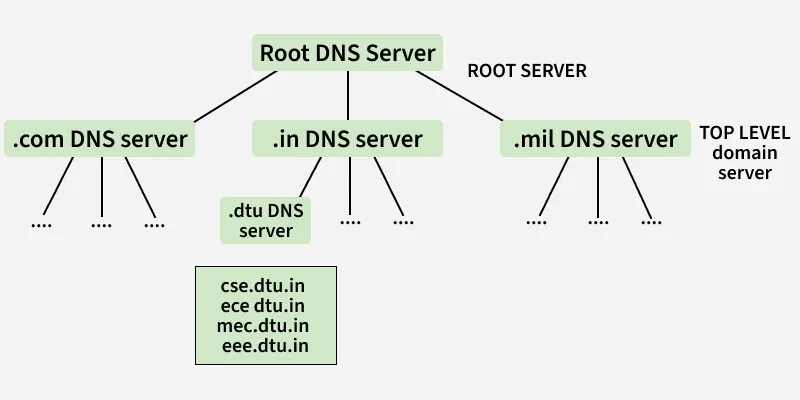
The DNS hierarchy is meticulously designed to ensure scalability and reliability on a global scale. It organizes DNS servers into a layered structure:
- Root DNS Servers: These servers sit at the top of the hierarchy and direct queries to the appropriate TLD servers. They are vital for the global resolution process.
- TLD Servers: Responsible for managing top-level domains such as .com, .org, .net, and country-specific extensions like .uk or .jp, these servers route requests to the correct authoritative servers.
- Authoritative DNS Servers: These contain the actual DNS records for specific domains and respond with the accurate IP addresses needed for connection.
This hierarchical model allows DNS to handle billions of queries daily, ensuring the stability and scalability of the internet. For more about designing user-centric websites, visit this resource on web interface design.
Types of Domains
DNS categorizes domains into various types to organize the vast universe of websites efficiently:
- Generic Domains: These include popular top-level domains like .com, .org, .net, and .edu, recognized and used worldwide.
- Country Code Domains: Specific to regions or countries, examples include .in for India, .uk for the United Kingdom, or .jp for Japan.
- Inverse Domains: Utilized primarily for reverse DNS lookups, these domains map IP addresses back to domain names, which is useful for diagnostics and security. For example, to verify the IP address of geeksforgeeks.org, you might perform an nslookup for the domain.
Understanding these categories is critical for effective domain management and security planning.
The Role of DNS Servers
When a client device requests access to a website, the request travels through a chain of DNS servers:
- The local machine first contacts the local name server.
- If the local cache lacks the required record, the request is routed to the root name server.
- The root server points to the appropriate TLD server.
- The TLD server directs the query to the authoritative DNS server for the specific domain.
- The authoritative server supplies the IP address, which is then relayed back through the chain.
Some DNS servers may also contain mappings of hostnames to IP addresses, facilitating quicker responses for frequently visited sites.
DNS Resolution Process
DNS resolution—also known as DNS lookup—is the process of converting a human-readable domain name into its numerical IP address. It involves:
- DNS Resolver: The client-side component that initiates the lookup.
- Recursive Queries: The resolver contacts multiple servers in sequence until it finds the IP address.
- Iterative Queries: The resolver asks each server for the best available answer, which might be an intermediate response.
- Non-Recursive Queries: The resolver queries a cache-equipped server that already has the record.
Different query types serve specific purposes in this process, as detailed below.
Types of DNS Queries
DNS queries are generally categorized into three types:
- Recursive Query: In this type, if the resolver cannot find the record immediately, it requests the server to continue searching until the answer is found or an error occurs. This process ensures the user receives a definitive response.
- Iterative Query: Here, the resolver asks each server for the best answer it can provide, potentially receiving referrals to other servers if it doesn’t have the answer.
- Non-Recursive Query: This occurs when the resolver queries a server that already has the DNS record cached, resulting in a quick response without further lookups.
Understanding these query mechanisms helps in troubleshooting DNS issues and optimizing network performance.
DNS Caching and TTL
Caching is a vital feature that stores DNS query results locally, reducing the need for repeated external lookups and improving browsing speed. Each cached record has a Time-to-Live (TTL), which specifies how long it remains valid. Once the TTL expires, the cache is invalidated, and a fresh query is needed. This balance ensures data freshness while minimizing network load.
For example, if the TTL for www.geeksforgeeks.org is set to 3600 seconds, the IP address is retained in cache for one hour before requiring renewal. Proper management of cache and TTL settings can significantly enhance overall network efficiency.
Securing DNS with DNSSEC
While DNS is essential, it also presents security vulnerabilities, such as cache poisoning, where malicious entities inject false DNS data to redirect users to harmful sites. To mitigate these risks, DNS Security Extensions (DNSSEC) were developed:
- DNSSEC adds cryptographic signatures to DNS records.
- These signatures enable resolvers to verify the authenticity and integrity of responses.
- Implementing DNSSEC helps prevent attackers from tampering with DNS data, ensuring users are directed to genuine websites.
Learning about DNS security measures is crucial for protecting online assets and maintaining trustworthiness.
Reverse DNS Lookup
Unlike standard DNS queries that resolve domain names to IP addresses, reverse DNS lookups map IP addresses back to domain names. This process is useful for:
- Network Diagnostics: Administrators verify the source domain of network traffic.
- Email Security: Many email servers perform reverse lookups to authenticate sender identities, helping to prevent spam and phishing.
Typically, reverse DNS is used alongside standard DNS queries to provide a comprehensive view of network resources.
Common DNS Record Types
DNS records define how domain names function and connect with various services. The most frequently used types include:
- A Record: Maps a domain to an IPv4 address, such as geeksforgeeks.org to 185.199.109.153.
- CNAME Record: Creates an alias for a domain, allowing multiple domain names to point to a single site.
- MX Record: Specifies mail servers responsible for handling email traffic for the domain.
- TXT Record: Stores text information used for domain verification and security protocols like SPF and DKIM.
Proper configuration of these records is essential for web hosting, email setup, and security enhancements.
DNS in Application Layers and Networking
The DNS protocol operates primarily within the application layer of the network stack, facilitating seamless communication between user devices and web servers. It interacts with various network layers, including the physical, data link, network, transport, session, and presentation layers, to ensure reliable and efficient data transfer. Understanding how DNS fits into the broader networking architecture is key to optimizing digital infrastructure and troubleshooting connectivity issues.
By mastering DNS fundamentals, web developers, network administrators, and cybersecurity professionals can ensure reliable, secure, and user-friendly online experiences.