Why You Should Consider Using Dreamweaver
Web development can be a complex process, but Adobe Dreamweaver simplifies many aspects of building a website. Whether you’re a beginner or a seasoned designer, this tool offers features that make coding and designing intuitive and efficient.
An Overview of Dreamweaver’s Capabilities
Initially launched in 1997 by Macromedia and now part of Adobe’s Creative Cloud, Dreamweaver remains one of the most popular website editors. It’s widely valued for its versatility and user-friendly interface, which helps streamline the web design process. For those new to web development, the interface might seem daunting at first, but with practice, it becomes a powerful ally in creating professional websites.
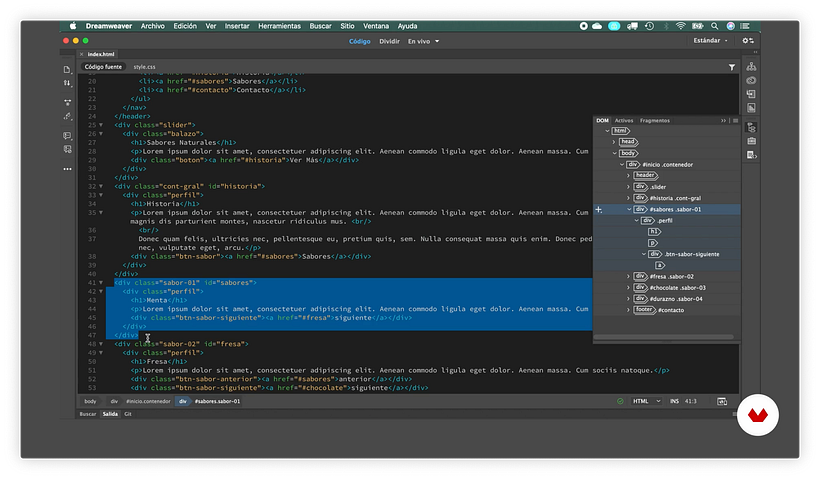
One of the key benefits of Dreamweaver is its ability to switch seamlessly between viewing the raw code and a visual preview. This dual-view approach allows designers to work more efficiently, seeing real-time changes as they modify the code. You can even have both views open simultaneously, making it easier to troubleshoot and refine your design.
Simplifying Responsive Design with Media Queries
Responsive websites are essential in today’s digital landscape. Dreamweaver makes managing media queries—functions that adapt the layout to different devices—more straightforward. While you can write media queries manually using HTML and CSS, Dreamweaver’s visual tools provide an intuitive way to create and manage these responsive elements. To deepen your understanding of web design essentials, check out this guide on what elements are essential to add to a web design brief.
Live Browser Preview
Another powerful feature is the ability to preview your website directly in various browsers, ensuring consistent appearance across platforms. Dreamweaver can generate a QR code for mobile device testing, so you can see exactly how your site looks on a smartphone or tablet. This functionality is particularly useful for verifying that your site appears correctly on all devices before publishing.
Managing Your Website Efficiently
As your website grows, organizing multiple pages and assets becomes increasingly important. Dreamweaver includes a comprehensive file manager that helps you keep track of images, fonts, and HTML files, making site management much more manageable.
Understanding the Site Structure with the DOM Tool
For those who prefer working directly with code, Dreamweaver offers a Document Object Model (DOM) viewer. This feature displays the hierarchical structure of your webpage, allowing you to select and manipulate elements more easily. It’s an excellent way to understand how different components fit together within your site.
Publishing Made Easy
Finally, Dreamweaver simplifies the deployment process. Its built-in FTP client allows you to upload your website directly to a hosting server, eliminating the need for external tools. You can also make quick updates and see changes reflected immediately, streamlining your workflow.
Learning Dreamweaver and Web Design
If you’re interested in mastering responsive web design, Arturo Servín offers a comprehensive course on Responsive Web Design with Adobe Dreamweaver, which covers everything from the basics of HTML and CSS to advanced techniques.
For further reading and tools, explore topics like what does web design entail to get a clearer picture of the overall process.
Additional Resources:
-
Discover the top free software for web design to expand your toolkit.
-
Learn about the essential elements to include in your web projects through this comprehensive guide.
By leveraging Dreamweaver’s powerful features, you can create responsive, well-organized websites with greater ease and confidence.