Web development has become an integral part of our digital lives, with countless websites and applications functioning seamlessly every second. But have you ever wondered what happens behind the scenes when you visit your favorite website? How does your request travel through various components, and how is the data processed to display the content you see? Gaining insight into web application architecture reveals the intricate yet efficient mechanisms that power modern web experiences.
In this comprehensive guide, we will explore the fundamental concepts of how web applications function, their core components, and the different architectural patterns used. Whether you’re a beginner or looking to deepen your understanding, this overview will help you grasp the essential elements that make web applications work smoothly and securely.
What Is Web Application Architecture?
Many people conflate websites and web applications, but they are distinct entities. A website traditionally refers to static pages with fixed content, whereas a web application offers a dynamic, interactive experience similar to desktop software. Web applications are designed to address specific problems—like online shopping, social networking, or booking systems—by providing user interactions and content updates in real-time.
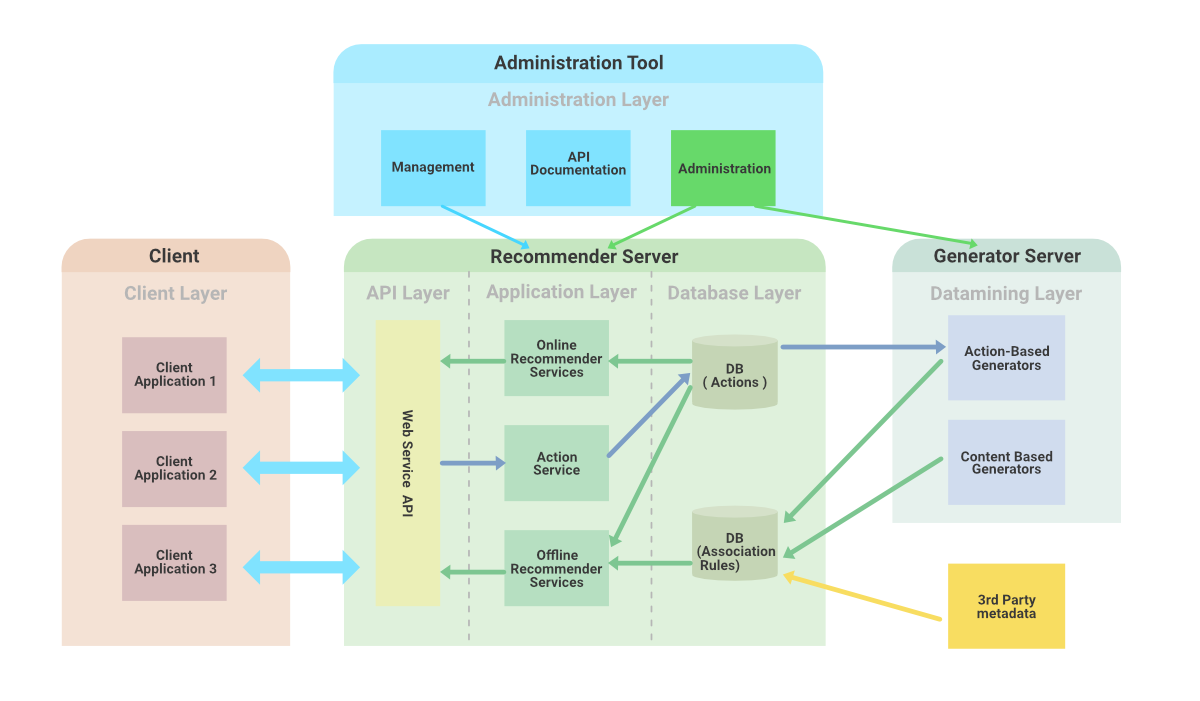
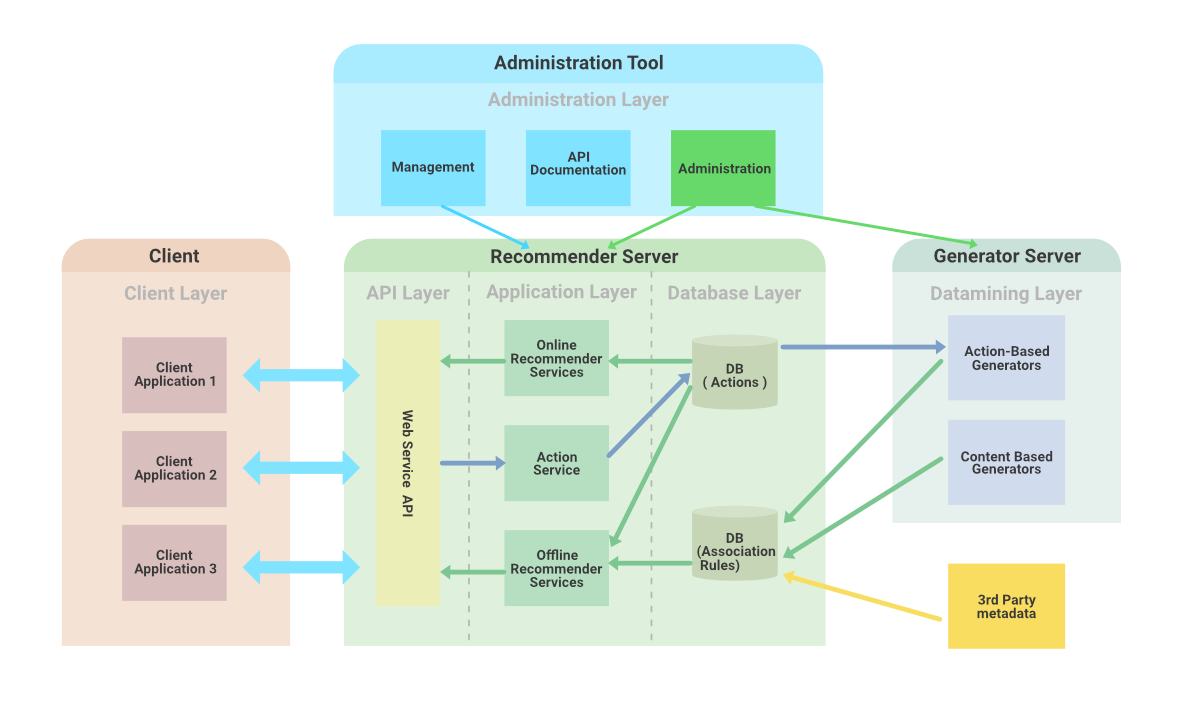
Web application architecture describes the framework that establishes how the client (user’s device) communicates with the server (hosting system). It defines how the different components—such as the user interface, middleware, databases, and servers—interact to process requests and deliver responses. Regardless of complexity, most web applications follow similar foundational principles, with variations tailored to specific needs.
When a user makes a request—say, to view a product on an e-commerce site—multiple layers work together within milliseconds to fetch, process, and display the required information. This process involves sending code to the browser, which interprets and renders the content, often with instructions for handling user interactions. For insights into designing engaging interfaces, you can explore mastering web interface design key features and essential elements.
Modern web applications must also address concerns related to reliability, scalability, security, and performance, especially as they handle increasing traffic from around the globe. Understanding the core architecture helps developers optimize these aspects effectively.
How Does a Web Request Operate?
Imagine you want to visit Flipkart.com. Here’s what happens step-by-step:
-
Entering the URL: You type flipkart.com into your browser. The browser contacts the DNS (Domain Name System) to resolve the domain name into an IP address, which locates the web server hosting the site. If you’ve visited it before, cached data might speed this process.
-
Sending the request: The browser dispatches an HTTP or HTTPS request to the server at that IP address. If secure communication is needed, HTTPS encrypts this data.
-
Processing on the server: The server receives the request and checks its stored data. It invokes business logic—handling routing, user authentication, or database queries—to determine what content to return.
-
Receiving the response: Once processing completes, the server sends back the requested web page along with associated resources. The browser then renders this content, presenting an interactive interface for the user.
This entire sequence happens in just a fraction of a second, demonstrating the efficiency of web architecture. The code delivered to the browser may include scripts and styles that define how the page looks and behaves, often guided by principles like mastering the art of white space to elevate web design.
How Does Web Application Architecture Function?
Web applications operate on both the client-side and server-side. When a user interacts with a web app, two primary programs run:
-
Client-side code: Executed within the browser, written in languages like HTML, CSS, and JavaScript. This code manages the user interface, handles user inputs, and updates the webpage dynamically.
-
Server-side code: Runs on the server, responding to HTTP requests. Written in languages such as Python, Java, PHP, or Ruby, it processes data, performs business logic, and communicates with databases.
Developers meticulously define the roles of each component, ensuring smooth interaction. For example, the server-side code responds to requests—like fetching user profiles or processing transactions—without exposing sensitive logic to the end-user. Meanwhile, client-side scripts manage visible elements, responding to user actions and updating the interface in real-time.
You can learn more about designing effective web interfaces at this resource.
Components of Web Application Architecture
Web applications are built from various interconnected components, generally categorized into two groups:
1. User Interface Components
These directly relate to what users see and interact with, including dashboards, notifications, logs, and settings. Their primary focus is delivering a pleasant, intuitive experience without necessarily affecting underlying functionality.
2. Structural Components
These handle the core functions of the application, including data processing, storage, and control flow. The main elements include:
-
Web Browser (Client): The interface through which users interact with the application.
-
Web Application Server: Processes requests, executes business logic, and communicates with databases.
-
Database Server: Stores all persistent data such as user information, transactions, and application content.
Understanding the interaction among these components is crucial for designing scalable, secure, and robust web applications.
The Three-Tier Architecture Model
Many web applications adopt a layered architecture, often called multi-tier or three-tier architecture, which separates concerns and facilitates independent development and upgrades.
Presentation Layer
Accessible via browsers, this layer includes all user interface elements—HTML, CSS, JavaScript, and related frameworks—that enable users to interact with the application.
Business Logic Layer
Also known as the application or domain layer, it processes user requests, enforces business rules, and manages workflows. For instance, booking a hotel involves multiple steps handled within this layer.
Persistence Layer
Responsible for data storage and retrieval, this layer manages interactions with databases or other storage solutions, whether on physical servers or cloud platforms. It ensures data consistency and security.
Additional components like cross-cutting code (handling security and operations) and third-party integrations (such as payment gateways or social logins) further enhance functionality.
Popular Web Application Architectural Patterns
Single Page Applications (SPAs)
SPAs load only the essential content initially, updating parts of the page dynamically as users interact. Technologies like AJAX facilitate seamless updates, providing a fast, fluid experience without full page reloads.
Microservices Architecture
This pattern decomposes an application into small, independent services, each responsible for specific functionalities. Developers can choose different programming languages and deploy services separately, boosting scalability and development speed.
Serverless Architecture
Leveraging cloud providers, serverless architecture allows developers to focus solely on writing application logic. Cloud platforms manage server provisioning and scaling, simplifying deployment and reducing operational overhead.
Understanding these patterns helps in selecting the right approach based on project requirements.
In summary, web application architecture provides the blueprint for how client and server components work together to deliver dynamic, scalable, and secure web experiences. By grasping these core concepts, developers can design better systems, optimize performance, and create engaging user interfaces. For further insights into crafting compelling web designs, explore this guide.